require
The most powerful validator. It takes a boolean expression and draws a message beside the property when the expression is false:
@tool # required for method calls in attributes
extends Node3D

@export
var min_size: int = 4

@export_custom(PROPERTY_HINT_NONE, "require:size >= min_size")
var size: int = 2

@export_custom(PROPERTY_HINT_NONE, "resource_type:Texture2D; require:icon")
var icon: Texture2D

@export_custom(PROPERTY_HINT_NONE, "require:is_even(even_number)")
var even_number: int = 3


func is_even(number: int):
    return number % 2 == 0
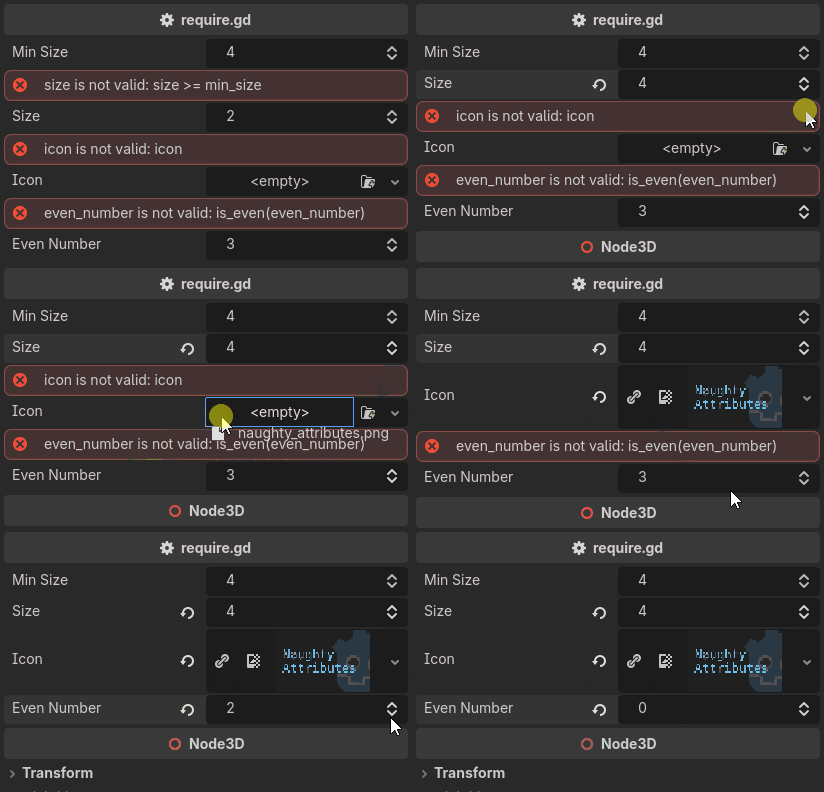
require:icon is a null check through Godot truthiness, require:hp > 0 a bound,
and require:is_even(size) a call with the argument written out.
It replaces both of Unity’s Required and ValidateInput attributes,
which are two attributes only because a C# attribute cannot carry an expression.
The message is built from the expression, so there is nothing to write:
size is not valid: size >= min_size
Note
require corrects nothing and writes nothing, so it is the one validator that never enters the undo history.
Note
A property that already carries a built-in hint cannot carry attributes,
which is why the icon above re-encodes its picker as resource_type:Texture2D.
See Writing Attributes.