dropdown
Provides an interface for dropdown value selection.
The option list is an expression, so it can name a property, a dictionary literal, or a method call – and it re-evaluates, so a list that reads another property follows it:
@tool # required for method calls in attributes
extends Node3D

const LEFT: Vector2 = Vector2(-1.0, 0.0)
const RIGHT: Vector2 = Vector2(1.0, 0.0)
const UP: Vector2 = Vector2(0.0, -1.0)
const DOWN: Vector2 = Vector2(0.0, 1.0)

@export
var titles: Array[String] = ["Novice", "Adept"]

@export_custom(PROPERTY_HINT_NONE, "dropdown:titles")
var title: String = "Novice"

@export_custom(PROPERTY_HINT_NONE, "dropdown:{'Warrior': 0, 'Archer': 1, 'Cleric': 2}")
var class_type: int = 0

@export_custom(PROPERTY_HINT_NONE, "dropdown:get_directions()")
var direction: Vector2 = LEFT


func get_directions():
    return {
        "Left": LEFT,
        "Right": RIGHT,
        "Up": UP,
        "Down": DOWN,
    }
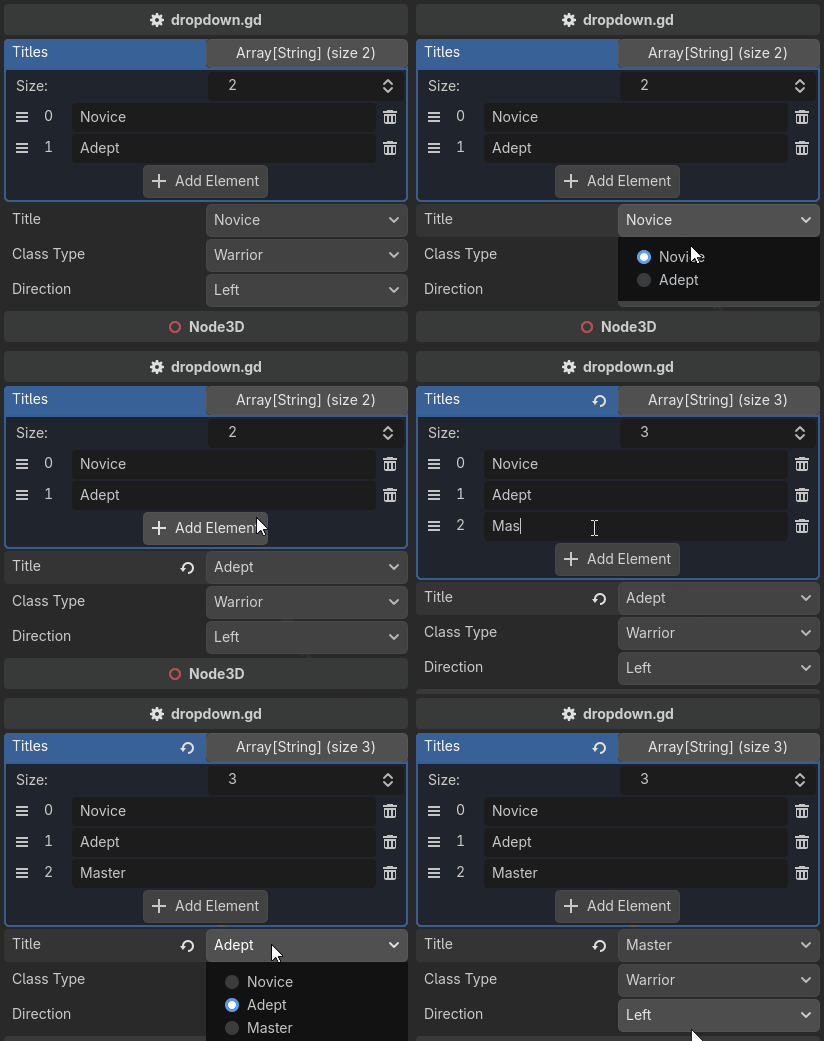
An Array uses each element as both the label and the value.
A Dictionary uses the key as the label and the value as the value,
which is what lets the options carry a type the label could not spell, such as a Vector2.
Note
Every option must be assignable to the property: the same type, int ↔ float,
String ↔ StringName, or null for an object property.
One option that is not rejects the whole list by name, and the property falls back to a widget that works.
Note
A stored value that matches none of the options is shown as {value} (not an option)
until you pick a real one. The widget never writes on your behalf – correcting a value is
a validator’s job, not a drawer’s.
This cannot be done with the built-in enum hint, whose list is baked into the property at build time.