enable_if / disable_if
Greys the property out and refuses input, based on some condition. The condition is written exactly as for show_if / hide_if:
@tool # required for method calls in attributes
extends Node3D

enum WeaponType { MELEE, RANGED, MAGIC }

@export
var is_immortal: bool = false

@export
var weapon_type: WeaponType = WeaponType.MELEE

@export_custom(PROPERTY_HINT_NONE, "enable_if:weapon_type == WeaponType.MELEE")
var melee_class: String = "class_name"

@export_custom(PROPERTY_HINT_NONE, "enable_if:!is_immortal")
var max_health: int = 100

@export_custom(PROPERTY_HINT_NONE, "disable_if:!is_at_max_health()")
var at_max_health: String = ""


func is_at_max_health():
    return self.health >= self.max_health
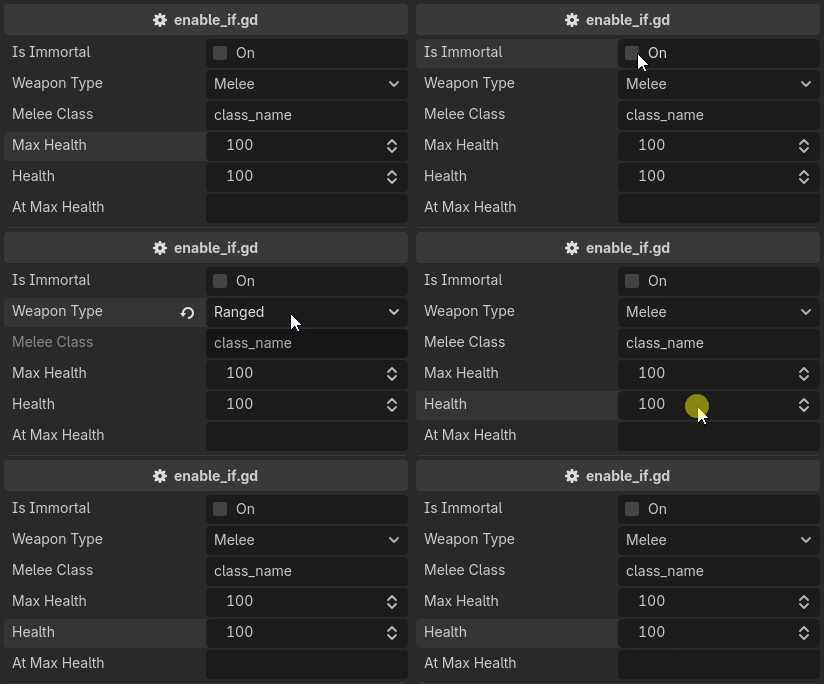
disable_if is enable_if with the condition negated. The two are the same attribute written from either side.
You can have more than one condition. They are ANDed, and &&, ||, ! and parentheses
are available inside a single condition as well:
@export_custom(PROPERTY_HINT_NONE, "enable_if:flag_0; enable_if:flag_1")
var enable_if_all: int = 0

@export_custom(PROPERTY_HINT_NONE, "enable_if:flag_0 || flag_1")
var enable_if_any: int = 0
Note
Read-only is a drawing state, not a storage state. Decorators stay lit above a disabled property, and validators keep running on it, so a clamp still applies to a value another property changed.
To make a property read only unconditionally, use read_only.